Show what happens in the browser: the interface you implemented, the people and states it supports, and the evidence behind a performance claim. This frontend developer example connects accessible form behavior with repeatable browser measurements, without turning a narrow test into a claim about every user.
These previews use the same layouts as the builder, with identical example content. Open a full preview to inspect the text and spacing.
Fictional candidate, employers, education and results. The optional portrait is AI-generated. Use your own evidence and photo; the example is not inserted into your resume.
Essential
A plain left-aligned identity and restrained section headings keep the appointment-form and browser-measurement bullets in a single reading column.
Before sending: Job dates use a small gutter. Check long employer names and the final project after exporting the full record.
The legacy Modern renderer places identity on the left and contacts on the right of a gray header; a shaded summary precedes the single-column experience body and three-column skills list.
Before sending: Contacts have a fixed-width area and skills spread across three columns. Check long URLs, reading order and every page rather than inferring fit from the design name.
“Use” opens signup with that design and photo preference selected for the builder. A free account is required. Free-plan PDF downloads include a watermark; see current plans for paid options. Photo conventions vary; follow the employer’s instructions and local expectations.
Essential, Signal and Modern show Elena’s identical resume. Each preview includes every exported page, with an optional photo you can switch on or off. The default is no photo. Choose by the legibility of the work, dates and links with your actual content; the sample portrait is fictional and is not added to your account.
Compare the layout details for Essential, Signal and Modern. Essential and Signal use a single body column with date gutters. Modern here is the existing gray-header design, with contacts opposite the name and a three-column skills list. These are layout choices; none certifies your skills or guarantees application-system parsing.
A complete frontend developer resume example
Elena Sato is an invented frontend developer working on appointment software after a junior web-development role. Every person, employer, qualification and result below is fictional teaching material. The example.com portfolio and project links are placeholders. Replace this record with work you can explain and support, rather than adopting its claims.
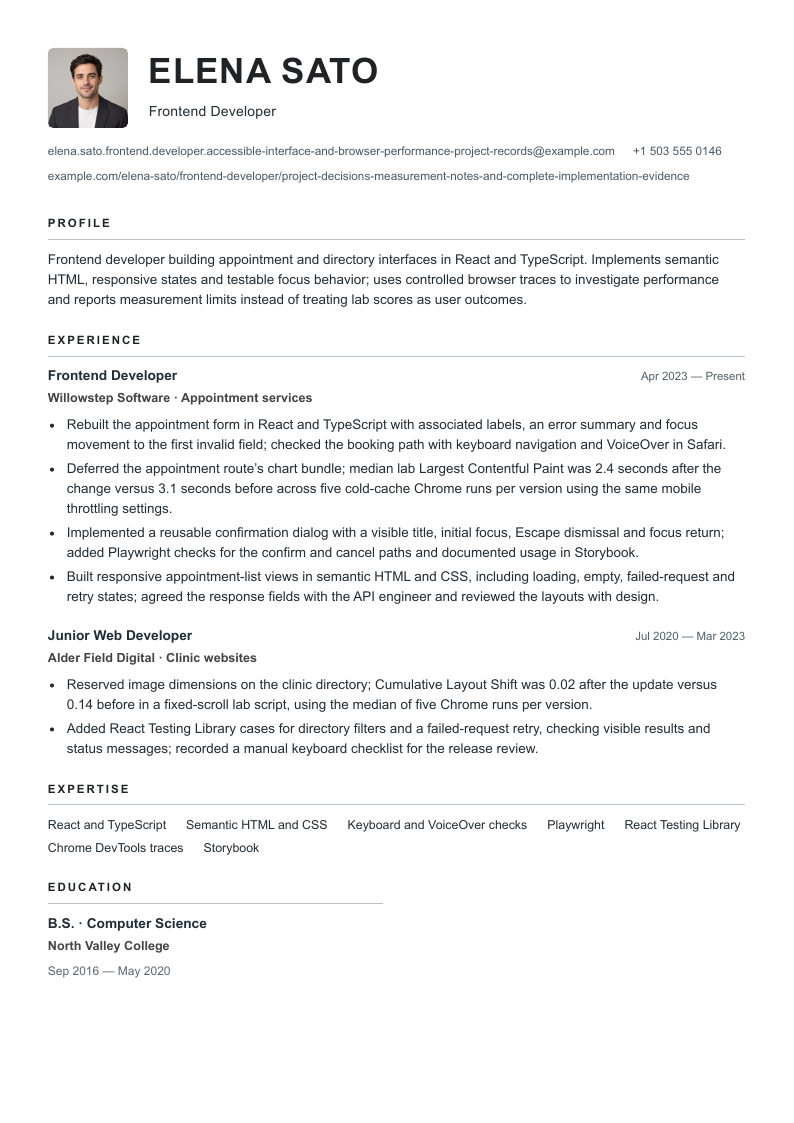
Frontend developer building appointment and directory interfaces in React and TypeScript. Implements semantic HTML, responsive states and testable focus behavior; uses controlled browser traces to investigate performance and reports measurement limits instead of treating lab scores as user outcomes.
Skills
React and TypeScript · Semantic HTML and CSS · Keyboard and VoiceOver checks · Playwright · React Testing Library · Chrome DevTools traces · Storybook
Experience
Frontend Developer
Willowstep Software · Appointment services
April 2023–Present
Rebuilt the appointment form in React and TypeScript with associated labels, an error summary and focus movement to the first invalid field; checked the booking path with keyboard navigation and VoiceOver in Safari.
Deferred the appointment route’s chart bundle; median lab Largest Contentful Paint was 2.4 seconds after the change versus 3.1 seconds before across five cold-cache Chrome runs per version using the same mobile throttling settings.
Implemented a reusable confirmation dialog with a visible title, initial focus, Escape dismissal and focus return; added Playwright checks for the confirm and cancel paths and documented usage in Storybook.
Built responsive appointment-list views in semantic HTML and CSS, including loading, empty, failed-request and retry states; agreed the response fields with the API engineer and reviewed the layouts with design.
Junior Web Developer
Alder Field Digital · Clinic websites
July 2020–March 2023
Reserved image dimensions on the clinic directory; Cumulative Layout Shift was 0.02 after the update versus 0.14 before in a fixed-scroll lab script, using the median of five Chrome runs per version.
Added React Testing Library cases for directory filters and a failed-request retry, checking visible results and status messages; recorded a manual keyboard checklist for the release review.
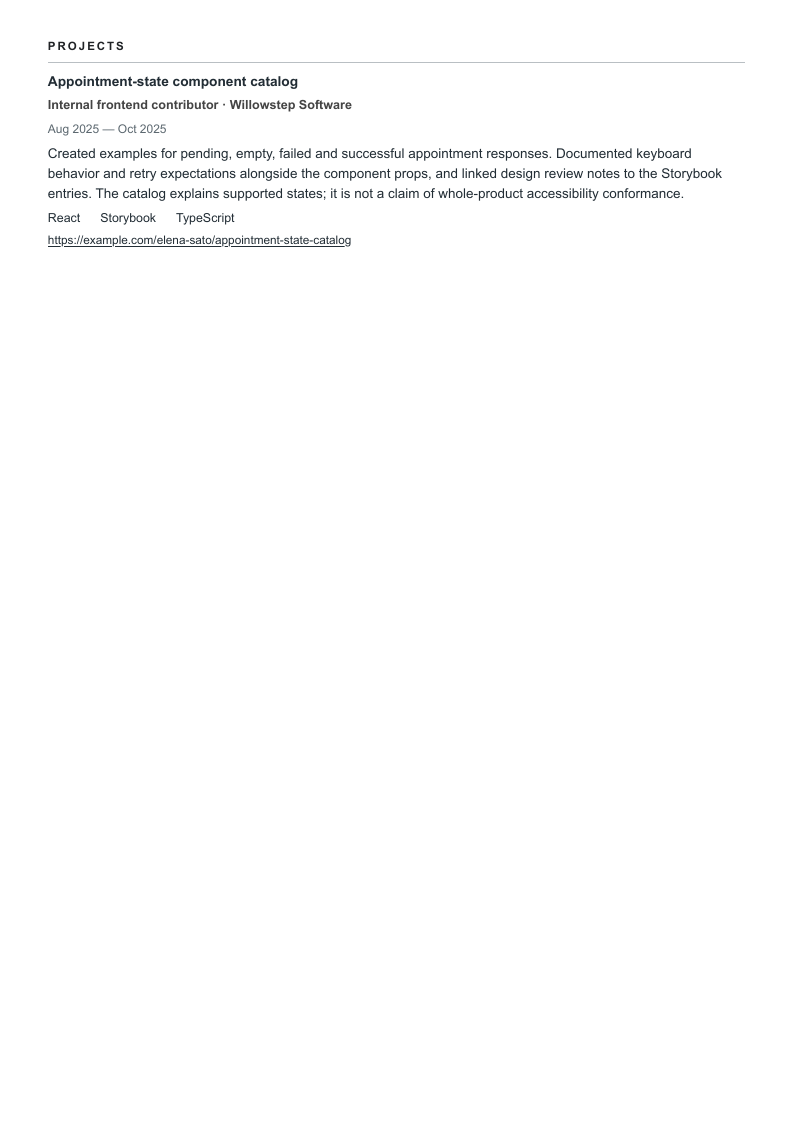
Created examples for pending, empty, failed and successful appointment responses. Documented keyboard behavior and retry expectations alongside the component props, and linked design review notes to the Storybook entries. The catalog explains supported states; it is not a claim of whole-product accessibility conformance.
Notice the different kinds of proof. A form bullet explains implemented behavior; a dialog bullet explains reuse and testing; a performance bullet defines a comparison. The project adds a component-state reference other developers could inspect. A useful record need not force an invented business result onto each of these contributions.
Describe accessibility scope and performance conditions
“Accessible” needs context. Name the task, the barrier, your change and the checks performed. For a form, that might mean associated labels, understandable errors and deliberate focus movement after submission. Say which browser and screen reader you used. A passing automated scan, a keyboard walkthrough and a full conformance evaluation are different levels of evidence. W3C’s initial-check guidance explicitly treats quick checks as a limited first review.
Performance needs a similarly clear boundary. In Elena’s example, Largest Contentful Paint (LCP) moves from 3.1 to 2.4 seconds in matched lab runs after a chart bundle is deferred. That is a 0.7-second difference for the tested route and setup. It is not a field percentile or proof that bookings increased. The separate Cumulative Layout Shift (CLS) example uses a fixed-scroll script; it should not be presented as every visitor’s experience.
Keep a short measurement note outside the resume: builds, route, fixture, browser version, device and network settings, cache state, number of runs and individual results. For real-user data, add the reporting window, eligible visits, percentile and collection method. Compare like with like. If several release changes or traffic differences could explain the movement, describe the observation without assigning all the effect to your code.
Frontend ownership can include client data handling, rendering and error states while another engineer owns the API. Name your actual boundary. For a senior role, describe a real component migration, performance budget, review practice or technical decision across teams; avoid turning “worked with backend engineers” into “architected the platform.”
Six annotated frontend resume bullet rewrites
Every “after” sentence appears in the complete sample. The evidence notes show what you would need from your own work before making a similar statement. A precise non-numerical contribution is stronger than a percentage with no traceable comparison.
A specific accessibility contribution
Before: Made the application fully accessible.
After: Rebuilt the appointment form in React and TypeScript with associated labels, an error summary and focus movement to the first invalid field; checked the booking path with keyboard navigation and VoiceOver in Safari.
Names the interface, implemented behavior and test environment. One checked path does not establish site-wide conformance, compatibility with every assistive technology or a legal compliance conclusion.
Evidence to keep: Pull request, form acceptance criteria, keyboard test steps and dated browser/VoiceOver versions.
Browser performance with a repeatable comparison
Before: Made the website 60% faster.
After: Deferred the appointment route’s chart bundle; median lab Largest Contentful Paint was 2.4 seconds after the change versus 3.1 seconds before across five cold-cache Chrome runs per version using the same mobile throttling settings.
The 0.7-second difference describes a controlled lab comparison, not all users or all pages. Keep the versions, content and settings comparable; field data can differ. It does not establish higher bookings.
Evidence to keep: Build identifiers, route and fixture data, Chrome version, device/network throttling, cache state and all ten trace results.
Interaction behavior and regression checks
Before: Built reusable components and improved quality.
After: Implemented a reusable confirmation dialog with a visible title, initial focus, Escape dismissal and focus return; added Playwright checks for the confirm and cancel paths and documented usage in Storybook.
Explains what the component does and which behaviors were checked. Browser assertions complement manual testing; passing them is not proof of complete accessibility.
Evidence to keep: Component code, Playwright assertions, Storybook examples and manual keyboard review.
Responsive states and API boundaries
Before: Owned the frontend and backend booking platform.
After: Built responsive appointment-list views in semantic HTML and CSS, including loading, empty, failed-request and retry states; agreed the response fields with the API engineer and reviewed the layouts with design.
Separates client implementation from API engineering and makes incomplete states visible. Working with an API does not prove ownership of its storage, authorization or server performance.
Evidence to keep: Client code, response contract, screenshots at supported widths and review notes.
Measured layout stability
Before: Eliminated layout shift across the site.
After: Reserved image dimensions on the clinic directory; Cumulative Layout Shift was 0.02 after the update versus 0.14 before in a fixed-scroll lab script, using the median of five Chrome runs per version.
States the page, intervention and measurement procedure. The scripted route is narrower than a whole-site field measure; a lab result does not guarantee that every real browsing session has the same stability.
Evidence to keep: Before/after builds, identical image fixtures, scroll script, browser settings and ten performance traces.
Testing with a defined scope
Before: Automated testing and prevented all bugs.
After: Added React Testing Library cases for directory filters and a failed-request retry, checking visible results and status messages; recorded a manual keyboard checklist for the release review.
Connects tools to observable behavior. The bullet claims checks were added, not that defects disappeared or test coverage proves every interaction correct.
Evidence to keep: Test cases, fixture responses, release checklist and the review record.
Support each skill with an implementation or check
Choose the framework and tools you have used for the vacancy in front of you. React is the sample’s stack, not a requirement for every frontend role. For Vue, Angular or another stack, keep the same evidence standard: behavior, responsibility, test and limits.
Frontend skills and supporting evidence in the fictional example
Skill
Evidence to name
Sample connection
React and TypeScript
A named interface and the behavior you implemented.
The appointment form, dialog and response-state catalog show separate client responsibilities.
HTML and CSS
Semantic elements, supported widths and a specific interaction.
The appointment list includes loading, empty and failed-request views.
Accessibility checks
The path, browser, assistive technology and findings you addressed.
The booking path is checked with a keyboard and VoiceOver in Safari.
Performance investigation
Comparable builds, device/network settings, runs and the measured metric.
The chart change has five cold-cache LCP runs per version; the directory has a separate CLS script.
Playwright and React Testing Library
Assertions about visible behavior, including failure paths.
Confirm/cancel paths, directory filters and retry behavior appear in the record.
Storybook
Examples that help another developer use a component correctly.
The catalog documents pending, empty, failed and successful responses.
The three current employer examples ask for different work. Mercury’s design-systems role emphasizes shared components and their use by product teams. Selara describes civic interfaces, API states and accessibility testing. Picnic’s senior role concerns real-time logistics clients and performance investigation. Their AI tools, federal eligibility, mobile and seniority requirements should be evaluated individually, rather than merged into one universal skills list.
Use the summary to set scope, then prove it in experience
A short summary can name your interface domain, strongest stack and contribution. Elena names appointment and directory work, React/TypeScript, focus behavior and browser traces. The dated roles then show those claims in context. Avoid adjectives such as “world-class” or “expert in all frameworks” that the record cannot explain.
Keep your actual job titles and dates. Put the most relevant implementation first for each role, then describe supporting tests, reviews or technical constraints. If a vacancy emphasizes component libraries, lead with a real reuse story. If it emphasizes performance, lead with a measured investigation and retain its conditions. The software engineer guide offers a broader engineering comparison when the role extends beyond the browser.
Build a first frontend application around a small, tested interface
You can show useful engineering judgment in an internship, course or independent project. Label the setting and your contribution accurately. A deployed demo is not evidence of paying customers, and a tutorial completed unchanged is not an original product.
Illustrative early-career adaptation
Summary: Junior frontend developer with a computer-science degree and a React appointment-search project. Uses semantic HTML, explicit loading and retry states, and documented keyboard checks to make small interfaces easier to review.
Project bullet: Built a clinic-search demo using synthetic records; added associated labels and a retry state, checked the search-to-result path by keyboard in Chrome and recorded two unresolved screen-reader issues.
Boundary: This claims a demo and a review, with known issues. It does not claim production users, complete accessibility or employer experience.
Link to a repository or short case note that explains setup, tradeoffs, tests and limitations. Keep keys and private data out of the project. If you have a short relevant work history, let a substantial project carry the detail while retaining accurate dates for other work.
List education and credentials with their actual status
Give the degree, field, institution and dates you earned. A bootcamp or course belongs under its real name and provider; mark an unfinished program as in progress. The fictional degree in this sample is not a universal entry requirement. Mercury’s posting considers several sources of experience, while the cited senior roles have their own expectations.
Add a credential only if you hold it, with issuer and status where relevant. A frontend course, accessibility workshop or cloud certificate cannot establish site-wide conformance, production architecture ownership or experience with a framework you have only read about.
Inspect long contacts with Essential’s photo on
This version changes only the email and portfolio contact URL. The work, skills, dates, education and projects are identical to the base record. Essential is shown with the photo enabled so you can check contact wrapping beside the identity block. Read the complete address and final URL segment in the text as well as the image.
Frontend developer building appointment and directory interfaces in React and TypeScript. Implements semantic HTML, responsive states and testable focus behavior; uses controlled browser traces to investigate performance and reports measurement limits instead of treating lab scores as user outcomes.
Skills
React and TypeScript · Semantic HTML and CSS · Keyboard and VoiceOver checks · Playwright · React Testing Library · Chrome DevTools traces · Storybook
Experience
Frontend Developer
Willowstep Software · Appointment services
April 2023–Present
Rebuilt the appointment form in React and TypeScript with associated labels, an error summary and focus movement to the first invalid field; checked the booking path with keyboard navigation and VoiceOver in Safari.
Deferred the appointment route’s chart bundle; median lab Largest Contentful Paint was 2.4 seconds after the change versus 3.1 seconds before across five cold-cache Chrome runs per version using the same mobile throttling settings.
Implemented a reusable confirmation dialog with a visible title, initial focus, Escape dismissal and focus return; added Playwright checks for the confirm and cancel paths and documented usage in Storybook.
Built responsive appointment-list views in semantic HTML and CSS, including loading, empty, failed-request and retry states; agreed the response fields with the API engineer and reviewed the layouts with design.
Junior Web Developer
Alder Field Digital · Clinic websites
July 2020–March 2023
Reserved image dimensions on the clinic directory; Cumulative Layout Shift was 0.02 after the update versus 0.14 before in a fixed-scroll lab script, using the median of five Chrome runs per version.
Added React Testing Library cases for directory filters and a failed-request retry, checking visible results and status messages; recorded a manual keyboard checklist for the release review.
Created examples for pending, empty, failed and successful appointment responses. Documented keyboard behavior and retry expectations alongside the component props, and linked design review notes to the Storybook entries. The catalog explains supported states; it is not a claim of whole-product accessibility conformance.
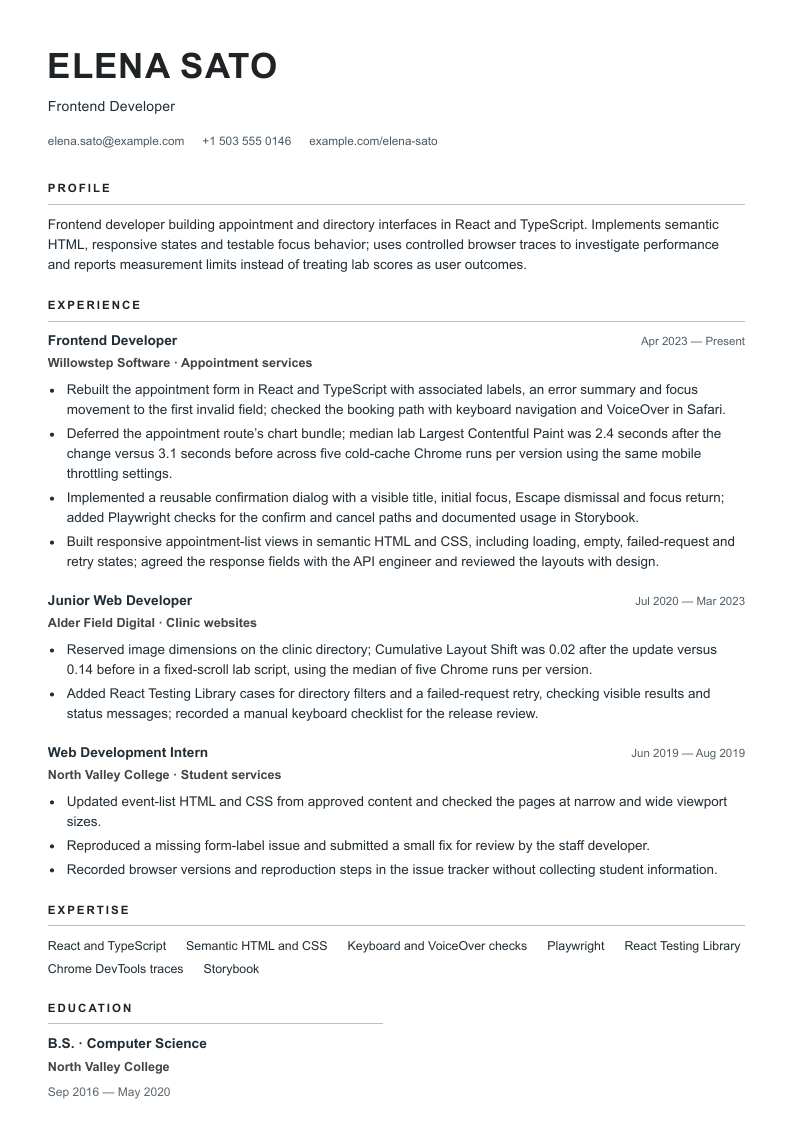
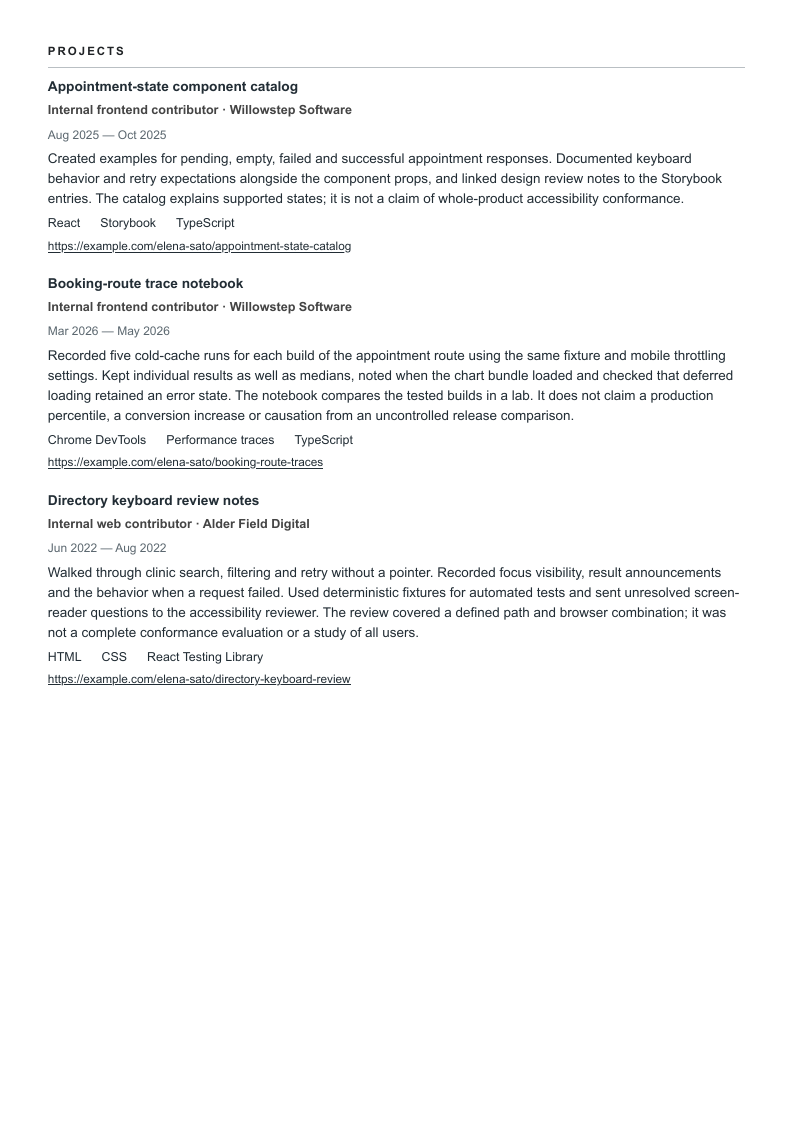
The expanded record keeps every base field and adds an earlier internship plus two dated projects. Essential is shown without a photo. Nothing is removed to obtain a page count. Check the long trace-notebook description, the final keyboard-review paragraph and the earliest job, including dates and links.
Frontend developer building appointment and directory interfaces in React and TypeScript. Implements semantic HTML, responsive states and testable focus behavior; uses controlled browser traces to investigate performance and reports measurement limits instead of treating lab scores as user outcomes.
Skills
React and TypeScript · Semantic HTML and CSS · Keyboard and VoiceOver checks · Playwright · React Testing Library · Chrome DevTools traces · Storybook
Experience
Frontend Developer
Willowstep Software · Appointment services
April 2023–Present
Rebuilt the appointment form in React and TypeScript with associated labels, an error summary and focus movement to the first invalid field; checked the booking path with keyboard navigation and VoiceOver in Safari.
Deferred the appointment route’s chart bundle; median lab Largest Contentful Paint was 2.4 seconds after the change versus 3.1 seconds before across five cold-cache Chrome runs per version using the same mobile throttling settings.
Implemented a reusable confirmation dialog with a visible title, initial focus, Escape dismissal and focus return; added Playwright checks for the confirm and cancel paths and documented usage in Storybook.
Built responsive appointment-list views in semantic HTML and CSS, including loading, empty, failed-request and retry states; agreed the response fields with the API engineer and reviewed the layouts with design.
Junior Web Developer
Alder Field Digital · Clinic websites
July 2020–March 2023
Reserved image dimensions on the clinic directory; Cumulative Layout Shift was 0.02 after the update versus 0.14 before in a fixed-scroll lab script, using the median of five Chrome runs per version.
Added React Testing Library cases for directory filters and a failed-request retry, checking visible results and status messages; recorded a manual keyboard checklist for the release review.
Web Development Intern
North Valley College · Student services
June 2019–August 2019
Updated event-list HTML and CSS from approved content and checked the pages at narrow and wide viewport sizes.
Reproduced a missing form-label issue and submitted a small fix for review by the staff developer.
Recorded browser versions and reproduction steps in the issue tracker without collecting student information.
Created examples for pending, empty, failed and successful appointment responses. Documented keyboard behavior and retry expectations alongside the component props, and linked design review notes to the Storybook entries. The catalog explains supported states; it is not a claim of whole-product accessibility conformance.
Recorded five cold-cache runs for each build of the appointment route using the same fixture and mobile throttling settings. Kept individual results as well as medians, noted when the chart bundle loaded and checked that deferred loading retained an error state. The notebook compares the tested builds in a lab. It does not claim a production percentile, a conversion increase or causation from an uncontrolled release comparison.
Walked through clinic search, filtering and retry without a pointer. Recorded focus visibility, result announcements and the behavior when a request failed. Used deterministic fixtures for automated tests and sent unresolved screen-reader questions to the accessibility reviewer. The review covered a defined path and browser combination; it was not a complete conformance evaluation or a study of all users.
This deliberately longer record tests continuation pages. For an application, choose relevant evidence before adjusting spacing. Keep measurement conditions that a reader needs to interpret the result; a second readable page may be preferable to compressing them into an unexplained claim.
Check the downloaded document as carefully as a release
Read every exported page at normal size. Check contacts, date gutters, page transitions and final project lines.
Copy the PDF text into a plain document and inspect its order, especially Modern’s contacts and skills columns. Open the portfolio and project links.
Follow the employer’s requested file type. Review the contact details, titles and dates populated after upload; visual legibility cannot guarantee parsing.
Verify each claim against your own code, traces and review notes. Check that any linked example can be shared and that its instructions still work.
Review your frontend resume with the analyzer and assess suggestions against your evidence. The design buttons open signup with that template and photo choice. Free-plan PDF downloads include a watermark; these examples show paid-plan output.
Questions, answered
Should I call myself a frontend developer or frontend engineer?
Keep your actual employment titles. Use the target role wording in a truthful headline and describe the interfaces and responsibility you have. A different title does not establish backend, architecture or management scope.
Can I say my work is WCAG compliant after an automated scan?
A scan finds only certain issues. Describe the specific changes and checks, their scope and environment. A comprehensive conformance claim needs a suitable evaluation; one passing tool or checked path is insufficient.
What if I only have Lighthouse or local performance results?
Label them as lab measurements. Keep the page, browser, settings, cache state, number of runs and comparison builds. Do not present a score as a real-user percentile or a business outcome.
Do I need React, Vue and Angular on the same resume?
List the frameworks you can support with actual work or clearly labeled projects, prioritizing the relevant vacancy. Explain depth through implementations rather than adding unfamiliar names.
Will my selected template and photo choice reach the builder?
The Use buttons carry the selected design and current photo preference through account signup. The fictional resume and portrait are not inserted. An account is required, and free-plan PDF downloads include a watermark.
Prepared by Resumize with AI-assisted research and drafting for English-language US applications. We checked three primary employer descriptions and the guidance below on October 27, 2026. Mercury and Picnic displayed application forms; Selara displayed an external Apply on LinkedIn link, whose completion was not tested. Publication dates were not shown and availability can change. The employers illustrate different scopes, not universal requirements. The fictional resume, annotated rewrites and measurement critique are original editorial examples, not endorsements.
US locations and remote US/Canada. Checked October 27, 2026: application form available; publication date not shown. Covers React/TypeScript components, interaction quality, accessible implementation and documentation. Early-career/intermediate scope and AI-tool expectations belong to this specific posting.
Remote US. Checked October 27, 2026: employer description and Apply on LinkedIn link available; publication date not shown. Covers React interfaces, API states, accessibility and tests. Public Trust eligibility and federal accessibility requirements are specific to this work; LinkedIn application completion was not tested.
New York, onsite. Checked October 27, 2026: application form available; publication date not shown. Covers real-time React applications, client networking and performance investigation. React Native, mentoring and senior architecture scope are particular requirements, not a checklist for every frontend applicant.
Read October 27, 2026. General guidance on readable layouts, dated history, standard headings and checking the requested file format. Its preference for simple single-column layouts informs our export checks; no design here has a universal parsing guarantee.
Read October 27, 2026. Supports relevant actions, work context and transferable evidence. The fictional employers, measurements and annotated rewrites are original Resumize editorial work.
Read October 27, 2026. Explains the limited scope of initial checks and why a more complete evaluation is needed before claiming comprehensive accessibility.
Read October 27, 2026. Distinguishes controlled test data from observations of real visits. Supports the measurement limitation, not the invented sample results.
Read October 27, 2026. Describes frontend interface implementation and variation in education requirements. Supports occupation scope; this guide does not infer a required degree or credential for every vacancy.