Help Desk Technician resume examples and templates
A help desk technician resume can show judgment in a single support case: what you asked, which check you tried, when you escalated and what confirmed the user could continue. Use this complete example to describe that sequence and make ticket counts mean what they actually measure.
These previews use the same layouts as the builder, with identical example content. Open a full preview to inspect the text and spacing.
Fictional candidate, employers, education and results. The optional portrait is AI-generated. Use your own evidence and photo; the example is not inserted into your resume.
Harbor
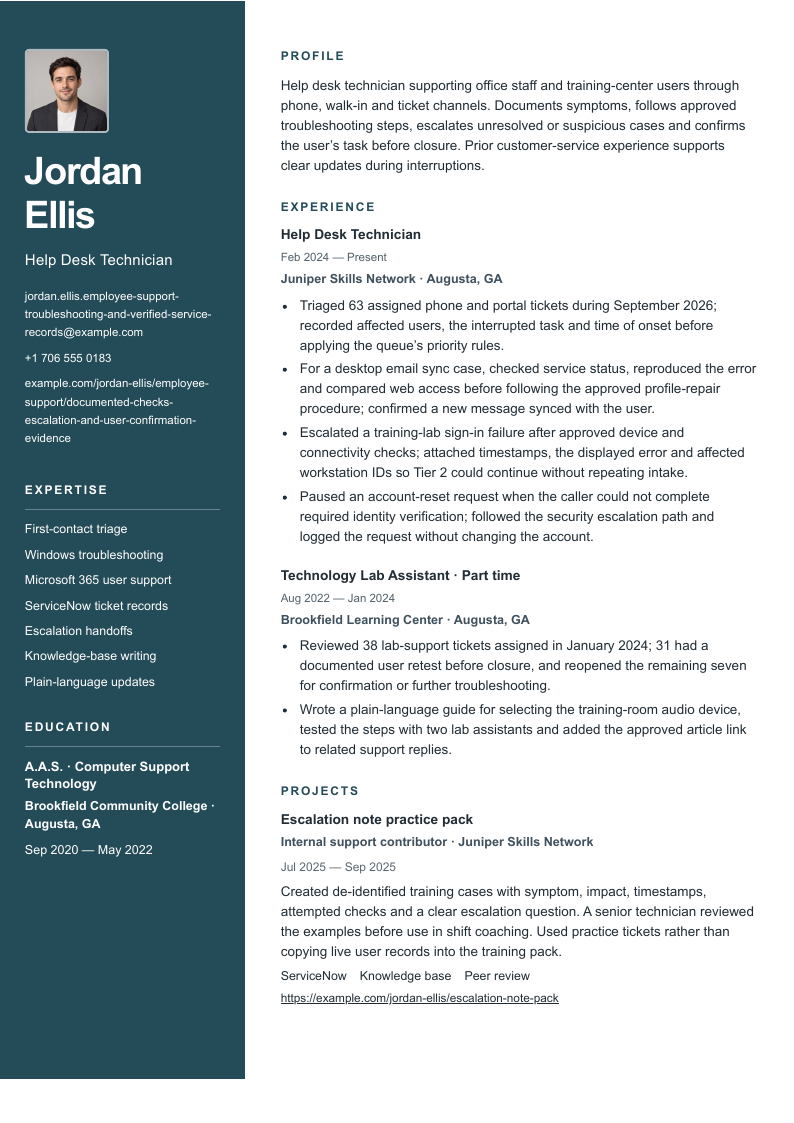
A dark left rail groups identity, contacts, skills and education; the wider right column follows the profile, experience and projects.
Before sending: Long contact strings wrap in the narrow rail. Check their final characters, the date gutter and both columns on every exported page.
A blue header rule and square section markers guide a single-column sequence from profile and experience to skills, qualifications and projects.
Before sending: The date gutter shares space with job headings. Verify longer titles and the late project section when the record continues to another page.
An uppercase name, plain header and fine section rules introduce a single-column body with restrained headings and job dates in a small gutter.
Before sending: The restrained styling puts the burden on clear bullet structure. Check the qualification block and project links near the end of the PDF.
“Use” opens signup with that design and photo preference selected for the builder. A free account is required. Free-plan PDF downloads include a watermark; see current plans for paid options. Photo conventions vary; follow the employer’s instructions and local expectations.
All three designs show Jordan Ellis’s identical record, with every exported PDF page available in the preview. The photo starts off; switch it on to compare the identity area and contact wrapping. The portrait is an illustrative fixture and is not added to your account. Page count depends on your content and selected layout.
Explore the layouts for Harbor, Signal and Essential. Harbor separates qualifications into a dark rail; Signal and Essential use a single body column. Choose a hierarchy you can read at normal size, then inspect the actual download with your content.
A complete help desk technician resume example
Jordan Ellis is a fictional help desk technician serving office staff and training-center users, with earlier lab support and customer-service experience. The record focuses on first response, desktop troubleshooting, useful escalation notes and evidence for closure. All people, organizations, schools, cases and numbers are invented. The example.com links are portfolio placeholders, not real candidates or work to claim.
Help desk technician supporting office staff and training-center users through phone, walk-in and ticket channels. Documents symptoms, follows approved troubleshooting steps, escalates unresolved or suspicious cases and confirms the user’s task before closure. Prior customer-service experience supports clear updates during interruptions.
Skills
First-contact triage · Windows troubleshooting · Microsoft 365 user support · ServiceNow ticket records · Escalation handoffs · Knowledge-base writing · Plain-language updates
Experience
Help Desk Technician
Juniper Skills Network · Augusta, GA
February 2024–Present
Triaged 63 assigned phone and portal tickets during September 2026; recorded affected users, the interrupted task and time of onset before applying the queue’s priority rules.
For a desktop email sync case, checked service status, reproduced the error and compared web access before following the approved profile-repair procedure; confirmed a new message synced with the user.
Escalated a training-lab sign-in failure after approved device and connectivity checks; attached timestamps, the displayed error and affected workstation IDs so Tier 2 could continue without repeating intake.
Paused an account-reset request when the caller could not complete required identity verification; followed the security escalation path and logged the request without changing the account.
Technology Lab Assistant · Part time
Brookfield Learning Center · Augusta, GA
August 2022–January 2024
Reviewed 38 lab-support tickets assigned in January 2024; 31 had a documented user retest before closure, and reopened the remaining seven for confirmation or further troubleshooting.
Wrote a plain-language guide for selecting the training-room audio device, tested the steps with two lab assistants and added the approved article link to related support replies.
Education
A.A.S. in Computer Support Technology · Brookfield Community College · Augusta, GA
September 2020–May 2022
Projects
Escalation note practice pack
Internal support contributor · Juniper Skills Network
July 2025–September 2025
ServiceNow · Knowledge base · Peer review
Created de-identified training cases with symptom, impact, timestamps, attempted checks and a clear escalation question. A senior technician reviewed the examples before use in shift coaching. Used practice tickets rather than copying live user records into the training pack.
Notice the different endpoints: an email sync case has a successful user test, a lab sign-in problem reaches Tier 2 with useful observations, and an unverified reset request stops without an account change. These are different kinds of completed support work. The closure review also discloses tickets that lacked confirmation, rather than turning every assigned ticket into a success.
Make the troubleshooting sequence and stopping point visible
A list of fixes hides how you chose one. Start with the interrupted task and the observable symptom. Identify the safe, approved check that narrowed the problem, then record the action and result. In Jordan’s sync case, comparing web access with the desktop app helps explain why a profile check followed. It does not diagnose every email incident or authorize a destructive reset.
Escalation judgment is part of support work. State what remained unresolved, what you had already checked and which observations helped the next team. A timestamp and exact error can be useful; copied credentials or unnecessary personal information are not. Follow the organization’s handling rules when adding screenshots or logs, and use de-identified practice cases in a public portfolio.
Do not make speed the only outcome. An urgent request may need a faster handoff, but urgency does not authorize an account reset after failed verification. Show that you followed the agreed priority and escalation process. For a suspected security issue, describe your observation and handoff without claiming you proved malicious intent or prevented an attack.
The title does not establish a universal scope. Some help desks also prepare laptops, maintain access or supervise technicians. This page concentrates on first response, diagnostic sequence and closure; the IT support specialist guide examines device lifecycle and change checks. Choose the example closest to your actual responsibilities and the target posting, while keeping your real job title.
Six annotated rewrites for help desk technician work
Draft with symptom and impact → approved check → resolution test or escalation. The six rewrites appear word-for-word in Jordan’s complete fictional resume. Each annotation separates what a ticket or review can substantiate from what would need another measure.
01A first response that establishes impact
Before
Handled a busy support desk.
Illustrative rewrite
Triaged 63 assigned phone and portal tickets during September 2026; recorded affected users, the interrupted task and time of onset before applying the queue’s priority rules.
Why it helps: The count describes assigned tickets in one month. It does not mean all were resolved, that 63 was a daily rate or that the candidate owned the entire shared queue.
Check your evidence: Assigned-ticket export, month boundaries, intake fields and the documented priority rules.
02An ordered troubleshooting sequence
Before
Troubleshot Outlook and network problems.
Illustrative rewrite
For a desktop email sync case, checked service status, reproduced the error and compared web access before following the approved profile-repair procedure; confirmed a new message synced with the user.
Why it helps: Shows why the next check was chosen and how restoration was verified. Successful web access narrows the investigation but does not prove the cause of every desktop sync failure.
Check your evidence: Recorded symptom, service-status check, web comparison, authorized procedure and user test.
03Escalation with usable evidence
Before
Escalated complex issues to Tier 2.
Illustrative rewrite
Escalated a training-lab sign-in failure after approved device and connectivity checks; attached timestamps, the displayed error and affected workstation IDs so Tier 2 could continue without repeating intake.
Why it helps: A handoff can be the right outcome. Evidence supports continuity; it does not show that the technician fixed identity infrastructure or that every repeated question was eliminated.
Check your evidence: Completed checks, error text with private details removed, affected-device list and escalation acknowledgment.
04A suspicious request that stops routine work
Before
Reset passwords and kept users secure.
Illustrative rewrite
Paused an account-reset request when the caller could not complete required identity verification; followed the security escalation path and logged the request without changing the account.
Why it helps: Makes the stopping condition explicit. The candidate does not bypass verification, label the caller an attacker or claim an incident was prevented without investigation evidence.
Check your evidence: Approved verification procedure, incomplete verification record and security-team handoff.
05Closure with a defined denominator
Before
Achieved a 95% first-call resolution rate.
Illustrative rewrite
Reviewed 38 lab-support tickets assigned in January 2024; 31 had a documented user retest before closure, and reopened the remaining seven for confirmation or further troubleshooting.
Why it helps: 31 of 38 is about 82% with documented retests, not a first-call resolution rate or a satisfaction score. The remaining cases are disclosed rather than counted as successes.
Check your evidence: Eligible ticket set, assigned dates, closure notes, user retest fields and reopened-case history.
06Communication captured in a reusable artifact
Before
Improved customer satisfaction with documentation.
Illustrative rewrite
Wrote a plain-language guide for selecting the training-room audio device, tested the steps with two lab assistants and added the approved article link to related support replies.
Why it helps: Names the problem, artifact and test. Publishing a guide does not prove that satisfaction rose or that ticket volume fell. Lab assistants are test readers, not a customer survey sample.
Check your evidence: Article revision, reviewer feedback, approval record and linked support replies.
Use the same care with queue metrics. First-response time starts at a defined event and ends at a defined response; resolution time uses different events. First-contact resolution needs a rule for eligible contacts, transfers and reopenings. Jordan’s 31 of 38 review concerns recorded retests, so calling it an 82% first-call resolution rate would still be wrong even though the arithmetic is correct.
Connect each skill to a support artifact
Match your skills to examples, not to the longest list of tools in a vacancy. If you used ServiceNow to record calls and route incidents, say that. Building workflows or administering the platform requires different evidence. Name Windows or Microsoft 365 where you can explain the supported task and approved troubleshooting you performed.
The three employer descriptions illustrate different contexts. Augusta Technical College describes routine assistance and escalation; Kings County’s senior role adds supervision and project work; Accenture Federal Services describes first-tier help desk work in a clearance-specific environment. Their seniority and entry conditions should not be combined into one checklist for every applicant.
Skills and the evidence behind them
Skill
Evidence to keep
Example in this record
First-contact triage
A symptom, affected task, impact and application of documented priority rules.
The 63-ticket month identifies assigned volume and the intake fields.
Windows and Microsoft 365 support
A specific test sequence and evidence of the user’s restored task.
The desktop sync case compares web access before an approved repair.
Escalation handoffs
Checks already completed, timestamps, observed errors and the destination.
The lab sign-in case reaches Tier 2 with workstation IDs and observations.
ServiceNow records
A traceable ticket artifact rather than a product name alone.
The practice pack structures symptoms, attempted checks and an escalation question.
Knowledge-base writing
A tested article, review status and a real support use.
Two assistants test the audio guide before its link enters related replies.
Plain-language updates
Instructions a user can follow and a clear next contact.
The audio guide and user retests show communication tied to a support task.
Connect the summary to the strongest support cases
Keep the summary narrow enough for the experience to prove. Jordan identifies the users, support channels, documentation habits and escalation approach. The current role supplies a diagnostic sequence, a useful handoff and a verification stop. “Solved every technical issue” would conflict with the honest escalations in the same record.
Choose the first bullet for the vacancy. A phone-heavy desk may value intake and clear updates; a training environment may value user walkthroughs and reproducible lab issues. State your assigned workload with its period and keep it distinct from the shared desk’s total. A queue count alone does not demonstrate the difficulty, quality or final disposition of those cases.
For a more experienced application, show greater responsibility with real examples: reviewing colleagues’ case notes, handling an assigned escalation category or coaching a new starter on the approved process. Distinguish occasional coaching from line management. Keep promotions and part-time roles under their real titles and dates.
Adapt customer service and lab work for a first help desk role
You can demonstrate listening, sequence and handoff without claiming enterprise experience. Choose a supervised lab shift, volunteer session or small personal practice environment, and say what was simulated. A retail role may show careful intake and updates; add a separate real technical example so the reader can assess both skills.
Summary: Customer service associate seeking a first help desk role, with experience clarifying requests and recording handoffs, plus supervised practice documenting Windows audio issues in a community lab.
Project bullet: Documented a simulated missing-audio case in a lab ticket, checked the selected output device and recorded a successful playback test; submitted the note to the supervising technician for feedback.
Boundary: This is one simulated case on an authorized lab device. It shows a test sequence and documentation, not production access, a paid support caseload or a resolution-rate improvement.
Retain the customer-service job with its real title. Explain a relevant behavior such as asking clarifying questions, handing an unresolved query to a supervisor or giving a promised update. Do not rename store customers as IT users or make classroom volunteers into enterprise clients.
Education and credentials: use the vacancy’s actual requirements
List the actual qualification and dates; Jordan’s fictional A.A.S. is an example, not a requirement. There is no certification in the sample. Add only credentials you hold, using the official issuer, title and current status. Label study in progress accurately, and distinguish a course completion from a professional certification.
Read employer-specific conditions before applying. The cited Accenture role requires a clearance and specifies certification timing for its federal environment. Kings County lists qualifications for a senior public-sector position. Those conditions do not apply automatically to a college help desk or a private employer. Never invent a clearance or describe eligibility as an active clearance.
Inspect long contact details with the photo on
Only the email and portfolio contact URL change in this version; the full work record, dates and qualifications remain intact. Harbor uses the optional photo so you can examine how long contact strings wrap in its narrow left rail. Check the final characters against the complete text, including the URL path.
Help desk technician supporting office staff and training-center users through phone, walk-in and ticket channels. Documents symptoms, follows approved troubleshooting steps, escalates unresolved or suspicious cases and confirms the user’s task before closure. Prior customer-service experience supports clear updates during interruptions.
Skills
First-contact triage · Windows troubleshooting · Microsoft 365 user support · ServiceNow ticket records · Escalation handoffs · Knowledge-base writing · Plain-language updates
Experience
Help Desk Technician
Juniper Skills Network · Augusta, GA
February 2024–Present
Triaged 63 assigned phone and portal tickets during September 2026; recorded affected users, the interrupted task and time of onset before applying the queue’s priority rules.
For a desktop email sync case, checked service status, reproduced the error and compared web access before following the approved profile-repair procedure; confirmed a new message synced with the user.
Escalated a training-lab sign-in failure after approved device and connectivity checks; attached timestamps, the displayed error and affected workstation IDs so Tier 2 could continue without repeating intake.
Paused an account-reset request when the caller could not complete required identity verification; followed the security escalation path and logged the request without changing the account.
Technology Lab Assistant · Part time
Brookfield Learning Center · Augusta, GA
August 2022–January 2024
Reviewed 38 lab-support tickets assigned in January 2024; 31 had a documented user retest before closure, and reopened the remaining seven for confirmation or further troubleshooting.
Wrote a plain-language guide for selecting the training-room audio device, tested the steps with two lab assistants and added the approved article link to related support replies.
Education
A.A.S. in Computer Support Technology · Brookfield Community College · Augusta, GA
September 2020–May 2022
Projects
Escalation note practice pack
Internal support contributor · Juniper Skills Network
July 2025–September 2025
ServiceNow · Knowledge base · Peer review
Created de-identified training cases with symptom, impact, timestamps, attempted checks and a clear escalation question. A senior technician reviewed the examples before use in shift coaching. Used practice tickets rather than copying live user records into the training pack.
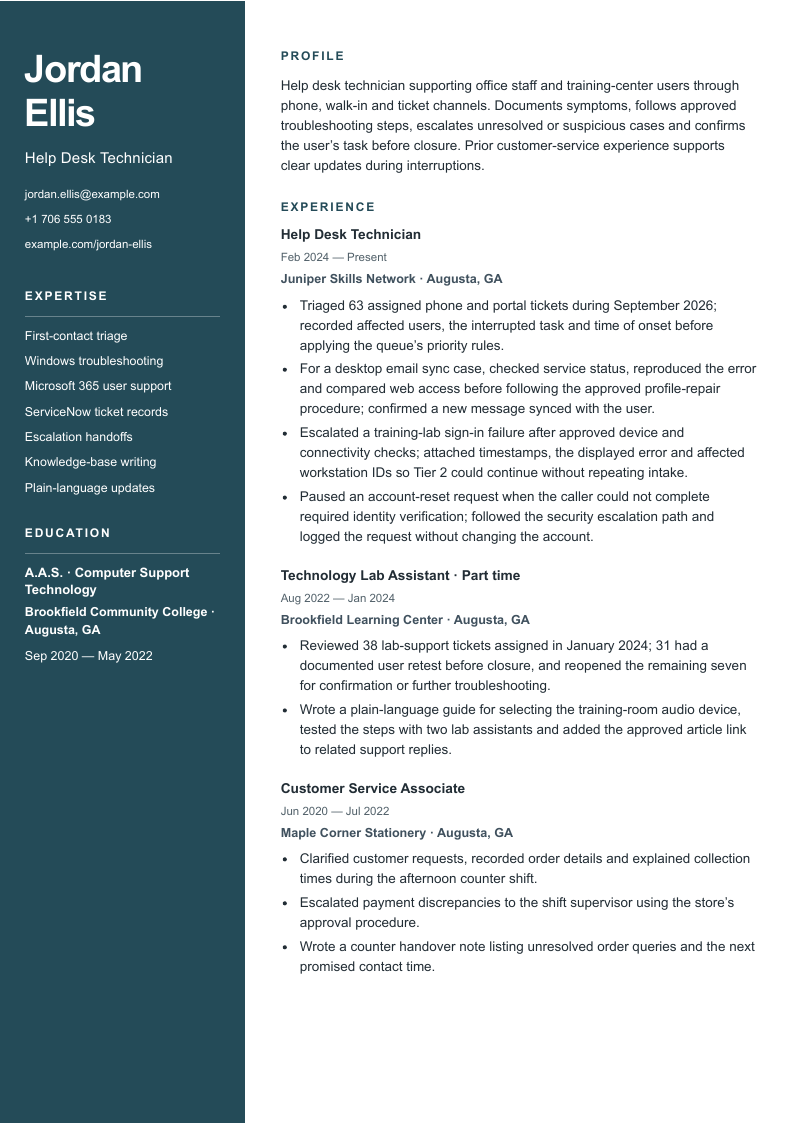
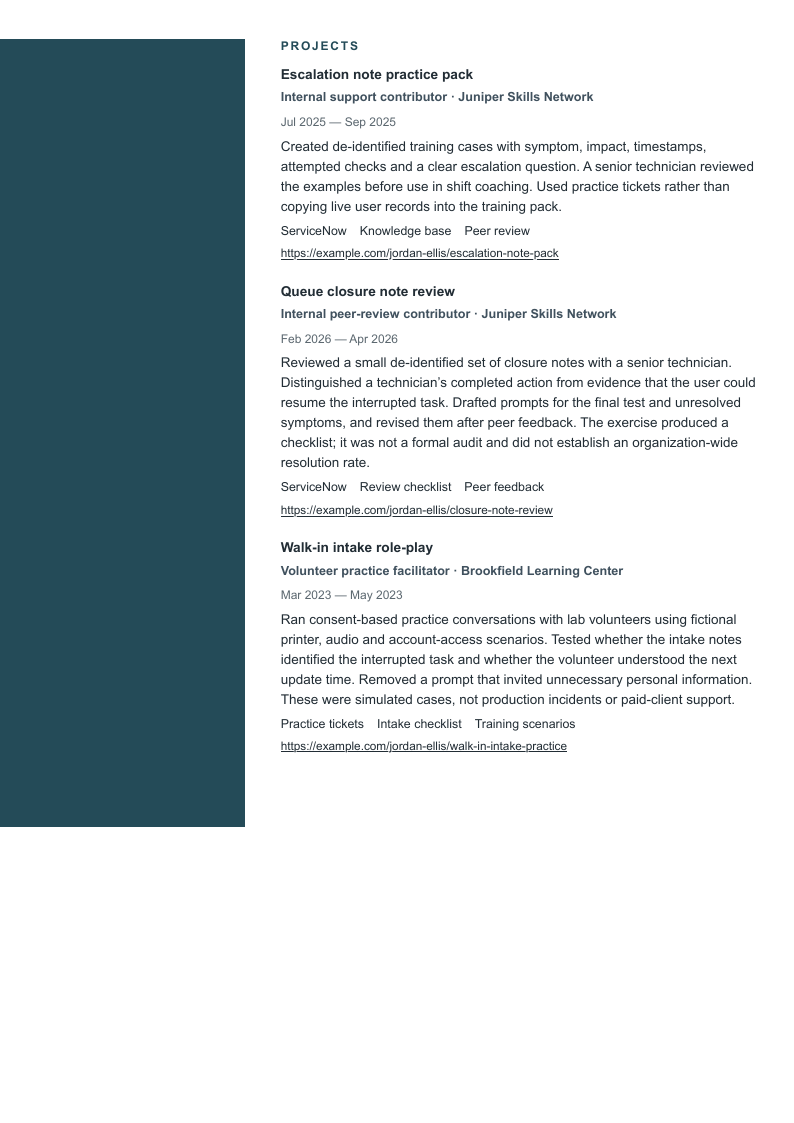
The expanded example keeps every base field and adds Jordan’s earlier customer-service job plus two dated projects: a closure-note review and a simulated walk-in intake exercise. Harbor is shown without a photo. Inspect the continuation of both columns and confirm the last project sentence and earliest job are still present. No bullet or contact field is shortened to force a page count.
Help desk technician supporting office staff and training-center users through phone, walk-in and ticket channels. Documents symptoms, follows approved troubleshooting steps, escalates unresolved or suspicious cases and confirms the user’s task before closure. Prior customer-service experience supports clear updates during interruptions.
Skills
First-contact triage · Windows troubleshooting · Microsoft 365 user support · ServiceNow ticket records · Escalation handoffs · Knowledge-base writing · Plain-language updates
Experience
Help Desk Technician
Juniper Skills Network · Augusta, GA
February 2024–Present
Triaged 63 assigned phone and portal tickets during September 2026; recorded affected users, the interrupted task and time of onset before applying the queue’s priority rules.
For a desktop email sync case, checked service status, reproduced the error and compared web access before following the approved profile-repair procedure; confirmed a new message synced with the user.
Escalated a training-lab sign-in failure after approved device and connectivity checks; attached timestamps, the displayed error and affected workstation IDs so Tier 2 could continue without repeating intake.
Paused an account-reset request when the caller could not complete required identity verification; followed the security escalation path and logged the request without changing the account.
Technology Lab Assistant · Part time
Brookfield Learning Center · Augusta, GA
August 2022–January 2024
Reviewed 38 lab-support tickets assigned in January 2024; 31 had a documented user retest before closure, and reopened the remaining seven for confirmation or further troubleshooting.
Wrote a plain-language guide for selecting the training-room audio device, tested the steps with two lab assistants and added the approved article link to related support replies.
Customer Service Associate
Maple Corner Stationery · Augusta, GA
June 2020–July 2022
Clarified customer requests, recorded order details and explained collection times during the afternoon counter shift.
Escalated payment discrepancies to the shift supervisor using the store’s approval procedure.
Wrote a counter handover note listing unresolved order queries and the next promised contact time.
Education
A.A.S. in Computer Support Technology · Brookfield Community College · Augusta, GA
September 2020–May 2022
Projects
Escalation note practice pack
Internal support contributor · Juniper Skills Network
July 2025–September 2025
ServiceNow · Knowledge base · Peer review
Created de-identified training cases with symptom, impact, timestamps, attempted checks and a clear escalation question. A senior technician reviewed the examples before use in shift coaching. Used practice tickets rather than copying live user records into the training pack.
Reviewed a small de-identified set of closure notes with a senior technician. Distinguished a technician’s completed action from evidence that the user could resume the interrupted task. Drafted prompts for the final test and unresolved symptoms, and revised them after peer feedback. The exercise produced a checklist; it was not a formal audit and did not establish an organization-wide resolution rate.
Volunteer practice facilitator · Brookfield Learning Center
March 2023–May 2023
Practice tickets · Intake checklist · Training scenarios
Ran consent-based practice conversations with lab volunteers using fictional printer, audio and account-access scenarios. Tested whether the intake notes identified the interrupted task and whether the volunteer understood the next update time. Removed a prompt that invited unnecessary personal information. These were simulated cases, not production incidents or paid-client support.
This longer record is a layout check, not a recommendation to include every past task. Choose relevant evidence before compressing text. If the useful material needs another page, review its continuation and readability instead of deleting the verification or ownership context that makes a claim understandable.
Check the final download before applying
Read every page at normal size. Inspect contacts, job titles, dates, section starts and the final project sentence. Harbor’s narrow rail and date gutter deserve a separate look.
Copy the exported text. Check the order in a plain document, particularly with Harbor’s two columns. Test the portfolio links and compare the complete contact strings with what appears in the PDF.
Follow the employer’s file request. A layout cannot guarantee parsing across every application system. Review titles, dates and contact fields populated after upload.
Recheck evidence and scope. Distinguish assigned, resolved, escalated and reopened tickets. Remove confidential user details and internal system information from public case studies; preserve accurate approval and ownership limits.
Review your resume with the analyzer and assess suggestions against your records. Design buttons open signup with the selected template and photo choice. The examples show paid-plan PDF output; free-plan downloads include a watermark.
How do I describe tickets I escalated rather than resolved?
State the symptom, the approved checks completed, the evidence attached and the team that received the case. A useful, timely handoff is a defensible contribution. Do not claim the final fix unless you performed it, and do not present escalation as failure when it followed the agreed process.
Should I put a first-contact resolution rate on my resume?
Use one only when you can explain the eligible contacts, the reporting period, transfers, reopenings and source. A count of closed tickets or documented retests is a different measure. If the definition is unavailable, use a concrete case or a clearly labeled workload count.
Can customer service count as help desk experience?
It can supply relevant listening, documentation and update skills, but keep the actual job title. Pair it with a real or clearly labeled simulated technical task if you have one. Do not claim technical support cases or administrator access from customer service alone.
Are A+ and a security clearance required for every help desk role?
No universal requirement follows from these examples. Check the vacancy. A federal role may require a particular active clearance or credential timing, while other employers describe different routes. Report only credentials and clearance status you actually hold.
Does the Use button preserve my template and photo preference?
Yes. Each Use button opens signup with that design and current photo preference selected for the builder. The fictional resume and portrait are not added to your account. A free account is required; free-plan PDF downloads include a watermark.
Prepared by Resumize with AI-assisted research and drafting for English-language US applications. We checked the three primary employer descriptions and CareerOneStop guidance below on October 27, 2026. The Georgia and New York employer pages offered Apply controls; Accenture displayed an application form. Kings County showed October 13, 2026 as its posting date; the other two did not show an exact publication date. Availability can change. The fictional cases, evidence critiques and layout comparisons are original editorial teaching examples, not employer endorsements or universal qualification rules.
Augusta, Georgia, US. Employer page and Apply for Job link available October 27, 2026; a relative posting age rather than an exact publication date is shown. Illustrates basic user support, work orders, caller instruction and escalation. The description also uses Help Desk Assistant; its part-time scope is specific to the college.
Brooklyn, New York, US. Published October 13, 2026; employer description and Apply control available October 27, 2026. Illustrates first-tier assistance alongside supervision and rollouts. Supervisory duties and the stated civil-service qualification routes apply to this senior vacancy, not every help desk technician.
Colorado Springs, Colorado, US. Application form available October 27, 2026; no publication date shown, with ongoing applications stated. Illustrates intake, documented troubleshooting and escalation. Active TS/SCI clearance and the listed certification timing are requirements of this federal role, not universal requirements.
Read October 27, 2026. General guidance on relevant experience, clear dates and specific actions with context. Candidate records, evidence critiques and design comparisons are original Resumize editorial fiction.
Read October 27, 2026. General guidance on readable resume structure and matching the employer’s requested format. No template can guarantee extraction behavior in every application system.